
Pure Storage FlashArray Architect Associate FAAA_004 Exam Questions
Preparing for the FAAA_004 exam is simple with Certs Vault. We offer easy-to-understand study materials that help you learn the most important exam topics. You can study using our PDF questions, practice online with a real exam-style test, or use the desktop practice software. Choose the study method that works best for you and prepare at your own pace.
At Certs Vault, we keep our FAAA_004 practice questions up to date. Whenever the exam syllabus or objectives change, we update our study materials so you always learn the latest topics. This helps you save time, avoid outdated content, and feel more confident when you take your exam.
Refer to the exhibit.
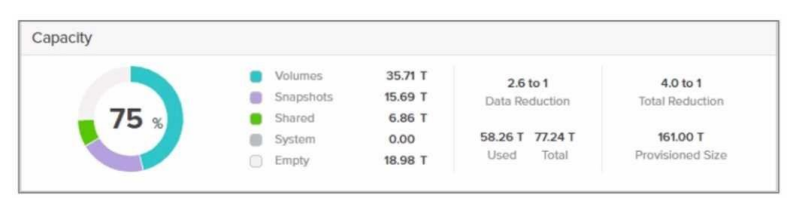
What does the depicted value 77.24 T represent?
Correct Answer: C
The value 77.24 T in the context of Pure Storage FlashArray represents C . The guaranteed capacity. Detailed Explanation: Guaranteed Capacity is a feature of Pure Storage’s Evergreen subscription model. It reflects the effective capacity Pure Storage commits to the customer based on their typical data reduction ratios (deduplication, compression, and pattern removal). This value is calculated as: Guaranteed Capacity=Physical Raw Capacity×Data Reduction Factor(DRF)Guaranteed Capacity=Physi cal Raw Capacity×Data Reduction Factor (DRF) Pure typically guarantees a minimum DRF (e.g., 3:1 for many workloads), but actual savings often exceed this. Why Not the Other Options? A . Total usable space: This would include the total logical capacity after data reduction and overheads (RAID-HD, metadata), which is usually larger than the guaranteed capacity. B . Total raw space: This refers to the physical capacity of drives (e.g., 100TB raw). The value shown (77.24T) is smaller than raw, so this is incorrect. D . Total deduplicated space: Pure Storage combines dedupe, compression, and pattern removal into a single "data reduction" metric. Deduplication alone is not isolated in capacity reporting. Official Reference: Pure Storage documentation explicitly defines Guaranteed Capacity as the "logical capacity Pure commits to deliver, factoring in data reduction." This aligns with the Evergreen//Foreversubscription model, where customers pay for usable capacity, not raw storage.
What causes a disruption to Pure FlashArray stateless controller operations or performance, if there is a single array?
Correct Answer: B
Among the listed options, physically relocating an array is the action most likely to cause a disruption to Pure FlashArray stateless controller operations or performance.
Why This Matters:
Physical Relocation:
Moving a FlashArray involves powering down the system, disconnecting cables, and transporting the hardware to a new location. This process inherently disrupts operations and performance until the array is reinstalled and brought back online.
Even with proper planning, physical relocation introduces downtime and potential risks (e.g., hardware damage during transport).
Why Not the Other Options?
A . Replacing a controller I/O module:
FlashArray controllers are designed with redundancy and hot-swappable components. Replacing an I/O module typically does not cause significant disruptions, as the other controller continues to handle operations.
C . Moving from a SAS- to NVMe-based shelf:
Transitioning to NVMe-based shelves is a planned upgrade that does not inherently disrupt operations. The array can continue functioning during the transition, though performance may vary temporarily.
D . Upgrade Purity//FA code:
Upgrading Purity//FA (the operating system for FlashArray) is a non-disruptive process. FlashArray supports rolling upgrades, ensuring continuous availability and performance during the update.
Key Points:
Physical Relocation: Causes unavoidable downtime and operational disruption.
Redundancy and Non-Disruptive Operations: FlashArray is designed to minimize disruptions for tasks like module replacement and software upgrades.
Planning Required: Physical relocation requires careful planning to minimize risks and downtime.
Pure Storage FlashArray Documentation: 'Maintenance and Relocation Best Practices'
Pure Storage Whitepaper: 'Non-Disruptive Operations with FlashArray'
Pure Storage Knowledge Base: 'Minimizing Disruptions During Array Maintenance'
Which FlashArray feature best protects local snapshots from ransomware attacks?
Correct Answer: B
The FlashArray feature that best protects local snapshots from ransomware attacks is SafeMode .
Why This Matters:
SafeMode Snapshots:
SafeMode is a security feature that creates immutable snapshots, meaning they cannot be deleted, modified, or encrypted by malicious actors, including ransomware.
These snapshots are locked for a user-defined retention period, ensuring data integrity and recoverability even in the event of a ransomware attack.
Why Not the Other Options?
A . CloudSnap:
CloudSnap offloads snapshots to cloud storage (e.g., AWS S3 or Azure Blob). While it provides an offsite backup solution, it does not inherently protect against ransomware attacks targeting local snapshots.
C . ActiveCluster:
ActiveCluster provides synchronous replication between two sites for high availability. While it ensures data redundancy, it does not protect against ransomware attacks targeting snapshots.
Key Points:
SafeMode: Creates immutable snapshots to protect against ransomware attacks.
Data Integrity: Ensures snapshots remain unaltered during the retention period.
Ransomware Protection: A critical feature for safeguarding data in modern IT environments.
Pure Storage FlashArray Documentation: 'SafeMode Snapshots for Ransomware Protection'
Pure Storage Whitepaper: 'Protecting Data Against Ransomware with FlashArray'
Pure Storage Knowledge Base: 'Best Practices for Using SafeMode Snapshots'
What should a protection group in a stretched pod be used for?
Correct Answer: A
A protection group in a stretched pod should be used for integrating ActiveCluster with asynchronous snapshot replication . This combination allows for synchronous replication within the stretched pod (using ActiveCluster) while also enabling asynchronous replication to a third site for additional disaster recovery protection.
Why This Matters:
ActiveCluster: Provides synchronous replication between two sites within a stretched pod, ensuring zero RPO and near-zero RTO for high availability.
Async Snapshot Replication: Extends the disaster recovery strategy by replicating snapshots asynchronously to a third site, providing an additional layer of protection against regional failures.
Combining these features ensures both local high availability and remote disaster recovery.
Why Not the Other Options?
B . Using CloudSnap to offload to a third-site target:
CloudSnap is used to offload snapshots to cloud storage (e.g., AWS S3 or Azure Blob). While it is useful for backup purposes, it does not integrate with ActiveCluster for synchronous replication.
C . Initiating ActiveDR failover/failback in a test scenario:
ActiveDR is designed for asynchronous replication and failover/failback scenarios but does not integrate with ActiveCluster in a stretched pod configuration.
D . Configuring fan-out async snapshot replication:
Fan-out replication involves sending snapshots to multiple targets asynchronously. However, this does not align with the use case of integrating ActiveCluster with async replication for a stretched pod.
Key Points:
Stretched Pod: Enables synchronous replication across two sites using ActiveCluster.
Async Replication: Adds a third-site replication target for comprehensive disaster recovery.
Integrated Protection: Combines high availability and disaster recovery into a single solution.
Pure Storage FlashArray Documentation: 'ActiveCluster with Async Replication'
Pure Storage Whitepaper: 'Disaster Recovery Strategies with FlashArray'
Pure Storage Knowledge Base: 'Using Protection Groups in Stretched Pods'
A System Administrator has a FlashArray//X70R3. They need to add a backup element as part of their data protection strategy. They have the following requirements:
* The solution should be offsite
* Cost needs to be kept as low as possible
* The backup needs to be stored in a different location from their current FlashArray
* Restore times are not a concern
Which solution should the SE recommend to the System Administrator?
Correct Answer: C
The System Administrator requires an offsite backup solution that is cost-effective, stores data in a different location from the current FlashArray, and does not prioritize restore times. The best solution to recommend is CloudSnap to a public cloud provider .
Why This Matters:
CloudSnap:
CloudSnap is a feature that offloads snapshots to cloud storage providers like AWS S3 or Azure Blob.
It is highly cost-effective because customers only pay for the cloud storage they use, and it eliminates the need for additional on-premises hardware.
Since restore times are not a concern, CloudSnap's slower restore process compared to on-premises solutions is acceptable.
Why Not the Other Options?
A . ActiveCluster to a FlashArray//C60:
ActiveCluster provides synchronous replication for high availability but does not meet the requirement for an offsite backup solution. Additionally, it is more expensive than CloudSnap.
B . ActiveDR to a FlashArray//C60:
ActiveDR provides asynchronous replication for disaster recovery but requires additional hardware (FlashArray//C60), which increases costs. It is less cost-effective than CloudSnap for backup purposes.
Key Points:
Cost Efficiency: CloudSnap leverages cloud storage, minimizing upfront and ongoing costs.
Offsite Storage: Ensures backups are stored in a different location from the primary FlashArray.
Restore Times: CloudSnap's slower restore process is acceptable given the customer's requirements.
Pure Storage FlashArray Documentation: 'CloudSnap for Offsite Backups'
Pure Storage Whitepaper: 'Cost-Effective Backup Strategies with FlashArray'
Pure Storage Knowledge Base: 'Choosing the Right Backup Solution for Your Workload'